自定义图标字体

前言

本篇文章将介绍如何和UI设计师配合,制定自定义的图标字体,最终生成自定义的ttf文件和样式。

实现

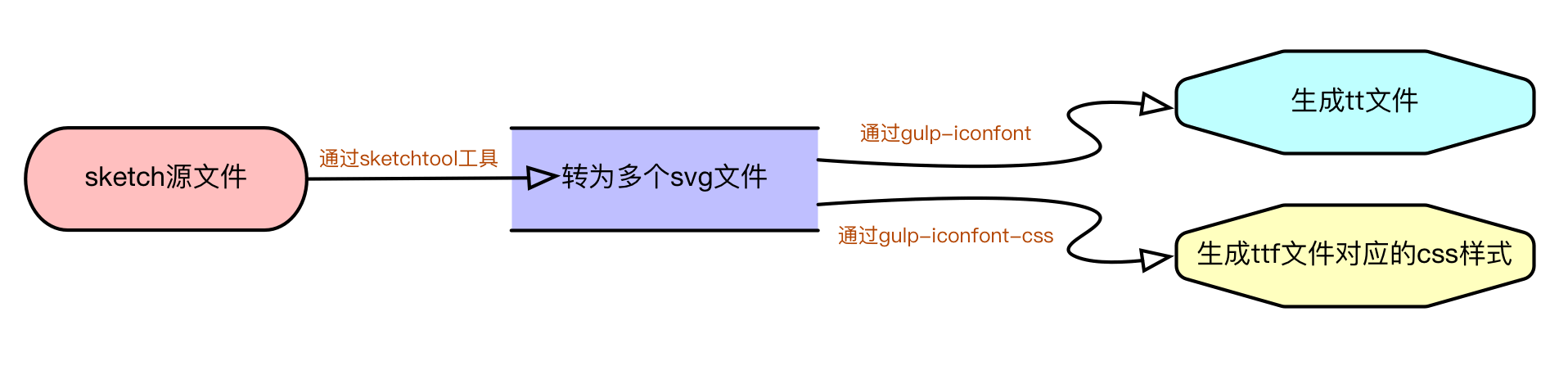
大致流程如下图所示:
icon-ttf

下面就针对它做具体的分析:

  1. 首先需要在电脑中安装 sketch 软件,因为我们要用到该软件的 sketchtool (一个内置工具)命令,将 .sketch 源文件处理为svg文件,如下所示:
1
shell.exec(`/Applications/Sketch.app/Contents/Resources/sketchtool/bin/sketchtool export slices --formats=svg --overwriting=YES --save-for-web=YES ${sketch} --output=${svgDir}`)
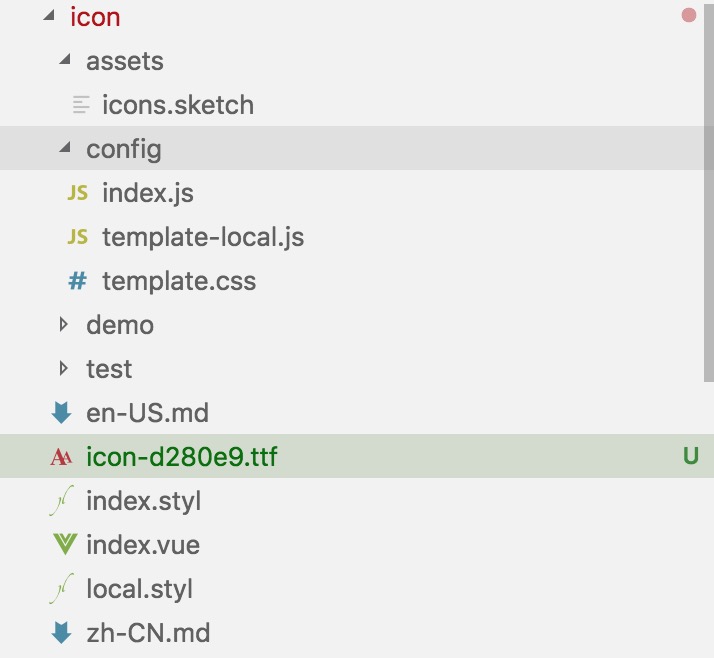
  1. 我们需要创建一个icon文件夹,用于处理sketch文件,目录结构如下所示:
    icon index

从上图可知,最终我们会生成一个带 md5 标记的ttf文件(通过 [gulp-iconfont](https://www.npmjs.com/package/gulp-iconfont) 模块)和对应的样式文件index.styl (通过 [gulp-iconfont-css](https://www.npmjs.com/package/gulp-iconfont-css) 模块),这2个模块的更多解释请查看各自的npm包介绍

template.css 文件相识代码见: https://github.com/youzan/vant-icons/blob/master/build/template.tpl

template-local.js 文件代码如下所示:

1
2
3
4
5
6
7
8
9
module.exports = (fontName, ttf) => {
return `@font-face {
font-style: normal;
font-weight: normal;
font-family: '${fontName}';
src: url('./${ttf}') format('truetype');
}
`;
};

下面是config文件下 index.js文件内容,可以自定义图标的样式名,通过以下格式:

1
2
3
4
5
6
7
module.exports = {
name: 'xxx-icon',
glyphs: [{
src: 'search.svg',
css: 'search'
}, ...]
}

具体的 gulp 脚本代码如下所示:

1
2
3
4
5
6
7
8
9
10
11
12
13
14
15
16
17
18
19
20
21
22
23
24
25
26
27
28
29
30
31
32
33
34
35
36
37
38
39
40
41
42
43
44
45
46
47
48
49
50
51
52
53
54
55
56
57
58
59
60
61
62
63
64
65
66
67
68
69
70
71
72
/**
* build iconfont from sketch
*/
const fs = require('fs-extra')
const gulp = require('gulp')
const path = require('path')
const glob = require('fast-glob')
const shell = require('shelljs')
const md5File = require('md5-file')
const iconfont = require('gulp-iconfont') // core module
const iconfontCss = require('gulp-iconfont-css') // core module
const config = require('../packages/icon/config')
const local = require('../packages/icon/config/template-local')

const iconDir = path.join(__dirname, '../packages/icon')
const svgDir = path.join(iconDir, 'svg')
const sketch = path.join(iconDir, 'assets/icons.sketch')
const template = path.join(iconDir, 'config/template.css')

// get md5 from sketch
const md5 = md5File
.sync(sketch)
.slice(0, 6)
const ttf = `${config.name}-${md5}.ttf`

// extract svg from sketch should install sketchtool first install guide:
// https://developer.sketchapp.com/guides/sketchtool/
shell.exec(`/Applications/Sketch.app/Contents/Resources/sketchtool/bin/sketchtool export slices --formats=svg --overwriting=YES --save-for-web=YES ${sketch} --output=${svgDir}`)

// remove previous ttf
const prevTTFs = glob.sync(path.join(iconDir, '*.ttf'))
prevTTFs.forEach(ttf => fs.removeSync(ttf))

// rename svg
config
.glyphs
.forEach((icon, index) => {
const src = path.join(svgDir, icon.src)
if (fs.existsSync(src)) {
fs.renameSync(src, path.join(svgDir, icon.css + '.svg'))
}
})

// generate ttf from sketch && build icon.styl
gulp.task('ttf', () => {
return gulp
.src([`${svgDir}/*.svg`])
.pipe(iconfontCss({
fontName: config.name,
path: template,
targetPath: '../icon/index.styl',
normalize: true,
firstGlyph: 0xf000,
cssClass: ttf, // this is a trick to pass ttf to template
}))
.pipe(iconfont({
fontName: ttf.replace('.ttf', ''),
formats: ['ttf'],
}))
.pipe(gulp.dest(iconDir))
})

gulp.task('default', ['ttf'], () => {
// generate local.styl
fs.writeFileSync(path.join(iconDir, 'local.styl'), local(config.name, ttf))

// remove svg
fs.removeSync(svgDir)

// upload ttf to cdn /no cdn shell.exec(`superman cdn /xxx ${path.join(iconDir,
// ttf)}`)
})

✨下面是完整的自定义图标字体解决方案的项目地址:https://github.com/youzan/vant-icons